
COLLECTING, EXPLAINED · 3 MIN READ
Your collection, one view.
Your profile brings your indexed NFTs, token balances and market activity together. Switch the layout to suit the way you explore, while keeping the same wallet in view.

One profile, two workspaces
- 01 · ACCOUNT
Check your wallet
Open My Profile and confirm the selected address and network.
- 02 · WORKSPACE
Choose your layout
Collector starts with a grid. Trader starts with a compact list.
- 03 · ACTION
Open the review
Inspect a piece or token, then use its available supported action.
Start with the right account
Connect your wallet, then open My Profile from the wallet menu. Check the displayed address before managing items. Switching accounts changes the portfolio you are looking at; an address on another network may have different assets.
The profile uses indexed holdings and current balance reads. Newly received NFTs can take time to appear. An empty view or a loading error does not prove that your wallet is empty: check the network, active filters and transaction on the explorer.
Choose your workspace
Collector mode starts with a visual item grid. Trader mode starts with the collection-style list and places NFT activity alongside it on larger screens. In Collector mode, Activity is a separate tab. You can search items and narrow them by collection in either mode.
Items shows your indexed NFTs. Listings and Bids show their corresponding market orders. Tokens shows wallet token balances using the same card and row presentation as the token directory. A token balance alone does not guarantee an available trading route.
Manage a piece from its review
Open an NFT to inspect its collection, token ID and available actions. Listing an item requires the supported order and approval flow; selecting an item is only the beginning of that process. Check price, currency and expiry before signing.
Use your profile activity or global Activity to follow confirmed NFT events. Disconnect from the wallet menu when you finish on a shared device. Disconnecting does not revoke permissions previously granted on-chain.
Recognize the Trader workspace
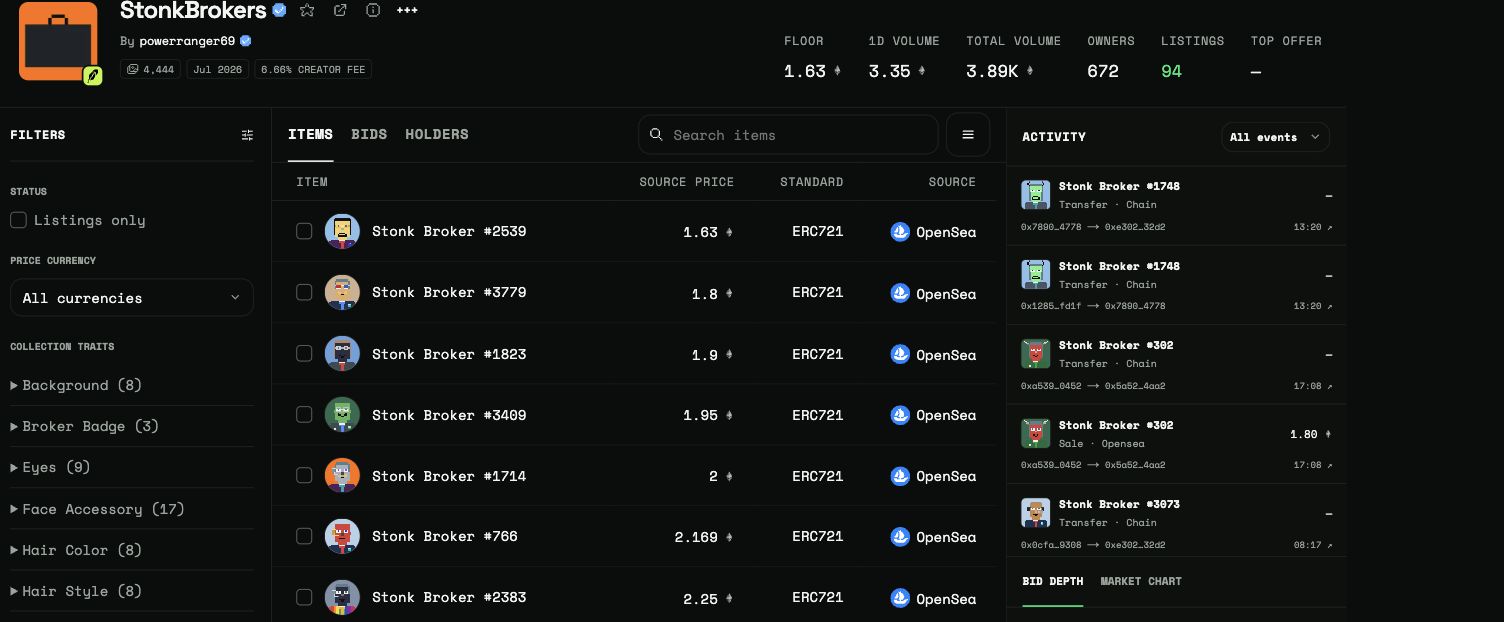
- Rows keep item identity and source prices together.
- Activity sits beside the working list on larger screens.
- Switch back to Collector for a visual grid and a separate Activity tab.